Changelogs
Stay up to date with the latest changes and enhancements.
Stay up to date with the latest changes and enhancements.

24. Sep 2026
Share
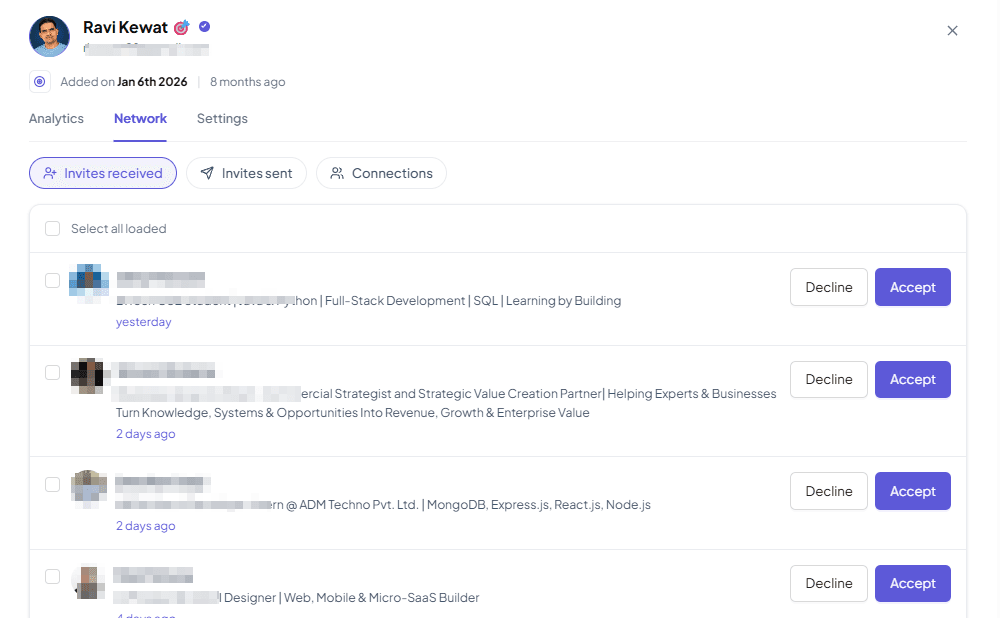
Managing your LinkedIn network is easier than ever with Outboundry. You can now manage your incoming invitations, sent invitations, and existing connections directly from Outboundry for any connected LinkedIn account.
With the new Network section, you can:
Manage incoming invitations: View all pending connection requests and choose to accept or ignore them directly from Outboundry.
Manage sent invitations: See all connection requests you've sent that are still pending and withdraw invitations when needed.
View existing connections: Browse your LinkedIn connections directly within Outboundry.
Manage multiple LinkedIn accounts: Access and manage the network for each connected LinkedIn account in one place.
You no longer need to switch between Outboundry and LinkedIn to keep track of your connection activity. View, organise, and manage your LinkedIn network right alongside your outreach campaigns.
Manage it from LinkedIn Accounts > Click LinkedIn Account > Network